This is just a simple show-off thread. Just post an image of your desktop here. This is mine.
http://fc05.deviantart.net/fs71/f/2010/ ... Winter.png
Post Your Desktop
Moderator: Moderators
-
Advent_Winter
- Posts: 693
- Joined: Wed Nov 11, 2009 5:22 pm
- Location: Earle, Arkansas
- Contact:
-
tsukasa4692

- Posts: 113
- Joined: Mon Mar 17, 2008 9:59 pm
Re: Post Your Desktop
yea, i would love to, but idk how to take a picture of my desktop...
-
Advent_Winter
- Posts: 693
- Joined: Wed Nov 11, 2009 5:22 pm
- Location: Earle, Arkansas
- Contact:
Re: Post Your Desktop
It's actually quite simple. You would first pull up your desktop. Then, there should be a key on your keyboard that says PRTSC (Print screen). Push that key. Then, open up the paint program, and press CRTL and the V key at the same time. Your desktop should appear in the window. Then, save the image, uploaded it to a image hosting website, like photobucket or imageshack, then place the url here. That's how I did it.

-
tsukasa4692
- Posts: 113
- Joined: Mon Mar 17, 2008 9:59 pm
Re: Post Your Desktop
oh wait, I figured it out!
http://tsukasa92.deviantart.com/art/My- ... -160845236
http://tsukasa92.deviantart.com/art/My- ... -160845236
-
Advent_Winter
- Posts: 693
- Joined: Wed Nov 11, 2009 5:22 pm
- Location: Earle, Arkansas
- Contact:

-
tsukasa4692
- Posts: 113
- Joined: Mon Mar 17, 2008 9:59 pm
Re: Post Your Desktop
Well I already had an account, so why not ^_^

Re: Post Your Desktop
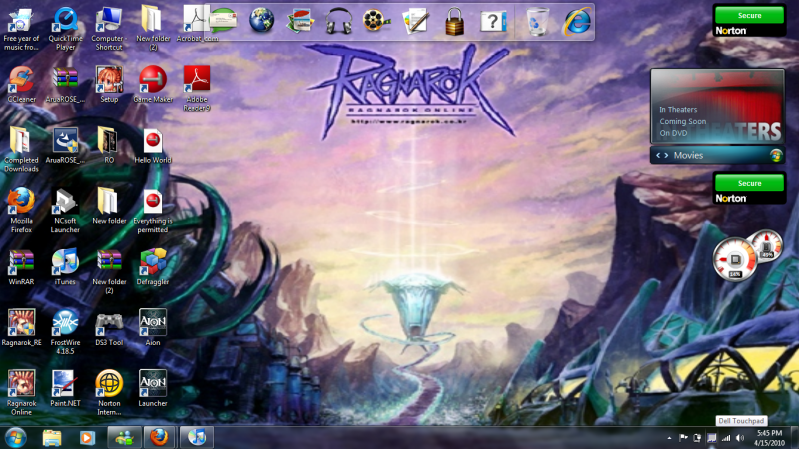
Hey wait, Tsukasa how did you get your desktop like that?!?!

-
TheSorrow

- The Legendary Paladin

- Posts: 6587
- Joined: Sat Dec 09, 2006 9:47 pm
- Location: The Edge of Madness
- Contact:
Re: Post Your Desktop
Evangelion 8D!!! Hawt wallpaper ;Ptsukasa4692 wrote:oh wait, I figured it out!
http://tsukasa92.deviantart.com/art/My- ... -160845236
...And AWESOME The World-like desktop too O-O
Well, as you'll see in the image itself, this is an old screenshot of my desktop, but i haven't done any true changes to it since then. I just don't take one right now, for certain reasons which are:
-Having like 15 different files scattered all over the desktop, since i've been so busy with homework and stuff and the desktop provides quick access to everything.
-Laziness.
So there >3>
http://i24.photobucket.com/albums/c29/M ... topyay.png
There is no use moving back, you can't trace back your path

Time has passed since we had last met, but we never meet without farewell
Time has passed since we had last met, but we never meet without farewell
-
tsukasa4692
- Posts: 113
- Joined: Mon Mar 17, 2008 9:59 pm
Re: Post Your Desktop
I'm sorry, but I feel like mines just... pure win
also, that wallpaper is badass
also, that wallpaper is badass
-
Advent_Winter
- Posts: 693
- Joined: Wed Nov 11, 2009 5:22 pm
- Location: Earle, Arkansas
- Contact:
Re: Post Your Desktop
But in all seriousness, how the hell did you get an R:2 based desktop?tsukasa4692 wrote:I'm sorry, but I feel like mines just... pure win
also, that wallpaper is badass
-
tsukasa4692
- Posts: 113
- Joined: Mon Mar 17, 2008 9:59 pm
-
Advent_Winter
- Posts: 693
- Joined: Wed Nov 11, 2009 5:22 pm
- Location: Earle, Arkansas
- Contact:
Re: Post Your Desktop
I want it. O:...Does it cost money?
*And be careful with double posting. Just edit your information to the original post instead of making a new one. Just a friendly reminder.*
*And be careful with double posting. Just edit your information to the original post instead of making a new one. Just a friendly reminder.*
-
tsukasa4692
- Posts: 113
- Joined: Mon Mar 17, 2008 9:59 pm
Re: Post Your Desktop
nope, just install it, drag icons from ur desktop to the slider, and enjoy. (may also be helpful to set up ctrl buttons) and then just arrange icons->hide desktop icons. and ta-da. also, the thing up top is called rocketdock, in case you want to try that out (better than windows taskbar)

Re: Post Your Desktop
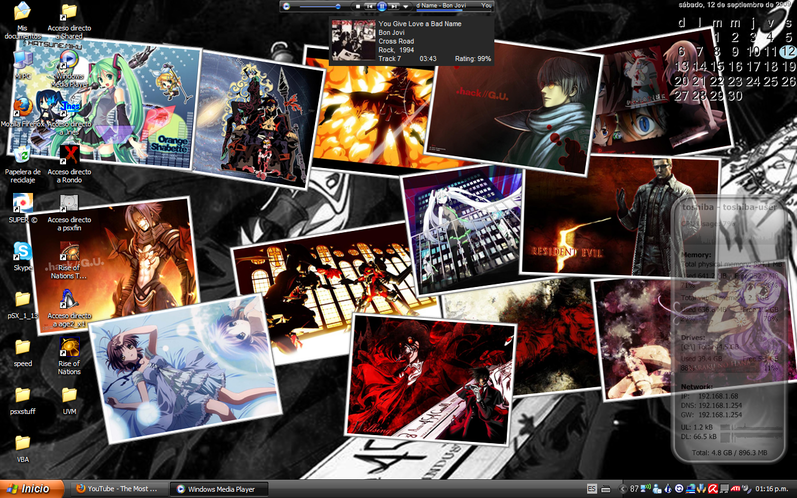
I got nothing better to do so... here's mine :P


Pressed the wrong button, eh?
Dude, I wanna punch you in the face so badly right now...
hidora wrote:GODDAMN YOU MUTANT NINJA BEARS!


Re: Post Your Desktop

The World has to end sometime.